
Build a Vocal Cue Mix That Supports the Performance Without Printing Effects
Build a practical vocal headphone mix, separate cue effects from recorded audio, and verify latency, spill, communication, and clean capture.
Start reading ↓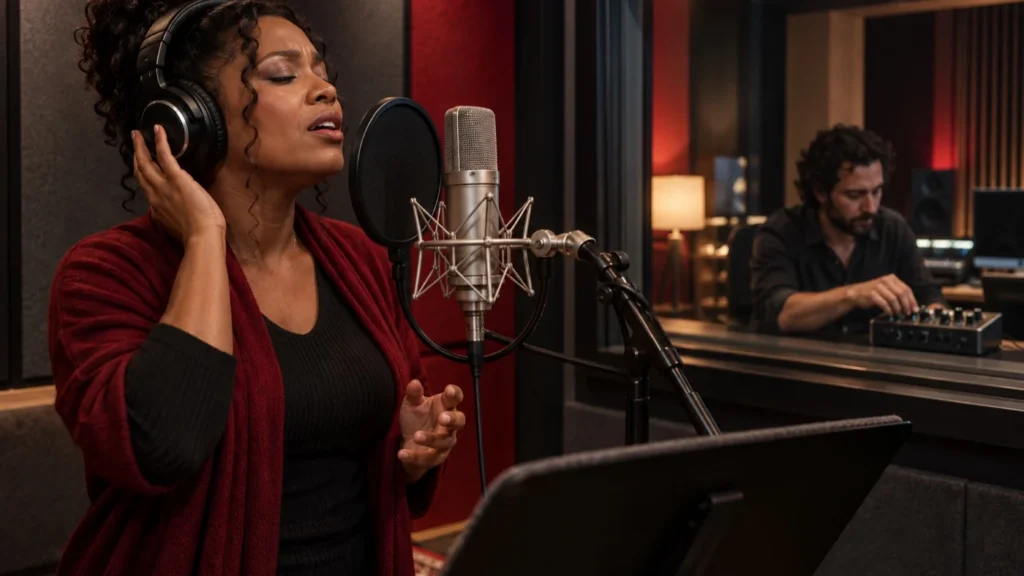
In this guide
A vocal cue mix is the sound a performer uses to make decisions in the moment. It can influence pitch reference, timing, confidence, and the way the singer balances against the arrangement. That makes it part of the recording process, even when the audience will never hear that exact mix.
The useful goal is to give the singer an intelligible, comfortable reference while preserving a clean recording when that is the agreed plan. Reverb in headphones does not have to become permanent reverb in the captured file. Understanding the route lets the engineer support a performance without making an unnecessary commitment.
Separate the recording path from the listening path
Draw a simple map from microphone to preamp, converter, recording track, playback system, and headphones. Identify where the headphone feed branches from the source. The actual route may pass through interface hardware, a DAW, a mixer, or a combination. Do not assume that a control called monitor changes the saved recording.
Mark which effects are in the recorded path and which are only in the cue path. A DAW track insert, input-processing feature, and interface DSP mixer may behave differently. Read the documentation for the actual system and verify a saved test file. The sound in the headphones alone cannot establish what is being captured.
Ask what the performer needs to hear
Start with a short conversation rather than a preset. Does the singer need a stronger pitch reference, clearer rhythmic information, less of their own voice, or a more natural sense of space? Different requests can sound similar when expressed only as more vocal. Ask what feels difficult before turning several controls.
Keep the level comfortable. Do not respond to an unclear mix by increasing every source. Reducing a masking instrument or unnecessary low-frequency content in the cue arrangement may make the voice easier to follow without making the headphones louder. Avoid forcing the performer to compete with an excessively loud reference.
Establish a usable dry balance first
Begin with the vocal and the essential musical elements. Check whether the performer can hear timing and pitch information clearly. An arrangement with every production layer active can make a simple monitoring problem harder to diagnose. Temporarily simplify the cue mix while preserving the full session for later playback.
Do not confuse a cue balance with a final mix decision. A singer may need an instrument louder than it will appear in the finished production. That is acceptable when the route and purpose are clear. The engineer can maintain a separate control-room perspective while supporting the performance.
Understand latency before adding effects
A delayed version of the singer's own voice can be distracting. The total experience depends on the actual interface, driver, buffer, processing, and routing. Do not promise that one buffer setting guarantees a comfortable session on every computer. Test the system with the intended session and supported configuration.
A direct-monitoring route can reduce the dependence on a DAW round trip, but it may provide different effect or balance options. Software monitoring can offer familiar processing while adding delay. Some systems support flexible combinations. Choose a documented route and listen for doubled or delayed self-audio rather than assuming the label zero latency describes every path.
Add cue reverb with a defined purpose
A modest reverb can make headphones feel less isolated or help a singer judge phrasing. It can also obscure consonants and pitch detail when excessive. Start conservatively, ask the performer what changed, and evaluate the next phrase. The useful amount depends on the material and person, not a universal wet percentage.
Keep the return clearly identified as cue-only when clean capture is intended. Confirm that a send is not routed back into the recording input through a loopback or bus assignment. A visually separate effects channel is not proof of isolation if the system's output is being rerecorded elsewhere.
Work through a hypothetical cue route
Imagine a singer recording into a DAW while hearing an interface's direct input and a software reverb return. The dry source reaches the recording track, while the headphone route combines the direct voice, backing arrangement, and return. The engineer checks that the software dry vocal is not also creating a distracting delayed duplicate.
A short test is recorded, saved, and reopened with the monitoring effects bypassed. The file contains the intended clean source. That establishes the tested route for this setup; it does not prove every interface supports the same combination. If the actual hardware cannot isolate the return as intended, choose a simpler supported arrangement rather than forcing the example onto it.
Prevent headphone spill from becoming the next problem
The cue mix can leak from headphones into the microphone, particularly with a loud reference or an open design. Evaluate the actual setup at a comfortable level and normal performance distance. Do not assume that any headphone type eliminates spill completely. Fit, playback level, source placement, and the microphone's response all matter.
Listen to a short recorded pause and a representative phrase. A click or guide vocal may become obvious between lines even when it feels quiet during performance. Adjust the cue content or level deliberately. Keep hearing comfort and useful communication ahead of an attempt to overpower the spill with processing.
Keep communication clear
A performer needs to hear instructions without sudden unexpected level changes. Use the supported talkback route and check who hears it. Do not accidentally print private control-room discussion into the recording or broadcast it through an unrelated output. Label routing and mute behavior so another engineer can operate the session safely.
Agree on a simple way to request a pause or cue change. A singer should not need to keep performing through discomfort because the engineer is editing another track. Stop for necessary adjustments and distinguish a technical monitoring issue from a performance direction. The cue system should support communication, not become an obstacle to it.
Save the monitoring state separately where practical
Record the relevant cue balance, routing, and effect choices in a supported scene or concise session note. Do not rely on private memory when another engineer may resume the work. Identify which settings affect the saved audio and which only affect listening. That distinction helps prevent an unintended change at the next session.
Avoid saving credentials or unrelated personal information in session notes. A useful handoff needs operational context, not every detail of the performer. Preserve original takes and the agreed recording configuration so a later mix decision remains reversible.
Verify the result before the important take
Record and reopen a short test using the intended source and cue arrangement. Check the actual file, not only the meter or headphone sound. Confirm the voice is complete, the expected processing is or is not printed, and no unwanted return has entered the capture. A successful soundcheck should describe what was actually tested.
A good cue mix helps the singer perform while leaving the engineer's choices deliberate. Separate listening from recording, build a clear balance, manage delay and spill, and verify the saved source. The best setup is the one the performer can use comfortably and the production team can explain and reproduce.
Keep learning
- Build a Recording Session That Another Engineer Can Understand
- Gain Staging Without the Magic Number
- EQ and Compression: Two Different Questions in a Mix
- Exporting a Mix: A Delivery Checklist That Prevents Avoidable Rework
Continue through Studio Life University — Built for the Grind.
References and scope
Educational guidance. Examples are hypothetical; no personal equipment testing, client results, or professional accreditation is claimed.